Your Chrome Tabs Are Out of Control? This Smart Session Manager Can Fix Your Workflow in Minutes
Most Chrome users don’t have a browsing problem. They have an organization problem.
A browser is no longer just a place to open websites. For many people, Chrome has become a complete digital workspace where everything lives:
- Work projects
- Client research
- Online documents
- Shopping lists
- Learning resources
- Development tools
- Personal information
- Creative ideas
The problem starts when browser tabs begin multiplying.
A few tabs become twenty. Twenty become fifty. Soon, your Chrome window is filled with pages you don’t want to close because every tab represents something important.
Maybe it is a report you still need to read. A reference article for a project. A document you need later. A tutorial you plan to complete. A product page you are comparing.
Closing tabs feels like losing progress.
But keeping hundreds of tabs open creates another problem.
Your browser becomes a digital storage room where finding anything takes more time than actually using it.
Important pages disappear among dozens of forgotten tabs. Different projects become mixed together. Chrome slows down. Your productivity drops.
This is the hidden cost of too many browser tabs.
A modern browser needs more than bookmarks. It needs a smarter way to save, organize, and restore complete workflows.
That is where a powerful session manager can transform the way you work in Chrome.
The Hidden Cost of Too Many Browser Tabs
A browser tab is not just a webpage.
Behind every open tab there is usually:
- Research time
- Work progress
- Collected information
- Future tasks
- Important decisions
For example, a freelancer may have:
- Client documents
- Competitor research
- Design inspiration
- Communication tools
- Analytics dashboards
all open at the same time.
A developer may have:
- Documentation pages
- GitHub repositories
- Testing environments
- Error solutions
- Learning resources
A student may have:
- Online classes
- Research papers
- Notes
- Reference material
The issue is not opening tabs.
The issue is managing the information inside them.
Without proper organization, your browser becomes difficult to navigate. You spend more time searching for lost pages instead of focusing on meaningful work.
A good browser productivity system should help you answer simple questions:
- Where did I save that important page?
- Which tabs belong to this project?
- Can I restore my workflow after restarting my computer?
- How can I clean hundreds of tabs without losing information?
A reliable session manager provides the solution.
Why Traditional Bookmark Managers Are Not Enough
Many users try to solve tab overload with bookmarks.
Bookmarks are useful, but they only save individual websites.
A bookmark remembers a page.
A session manager remembers your entire workflow.
Imagine working on a marketing project.
Instead of saving ten separate bookmarks:
- Competitor websites
- Research articles
- Analytics tools
- Reports
- Documents
you can save everything together as:
Marketing Research Session
Later, you can restore that complete workspace instantly.
This difference makes a session manager much more powerful than a traditional bookmark manager.
Bookmarks are like saving individual files.
Sessions are like saving your entire workspace.
For people who regularly work with large amounts of information, this approach creates a much cleaner browsing experience.
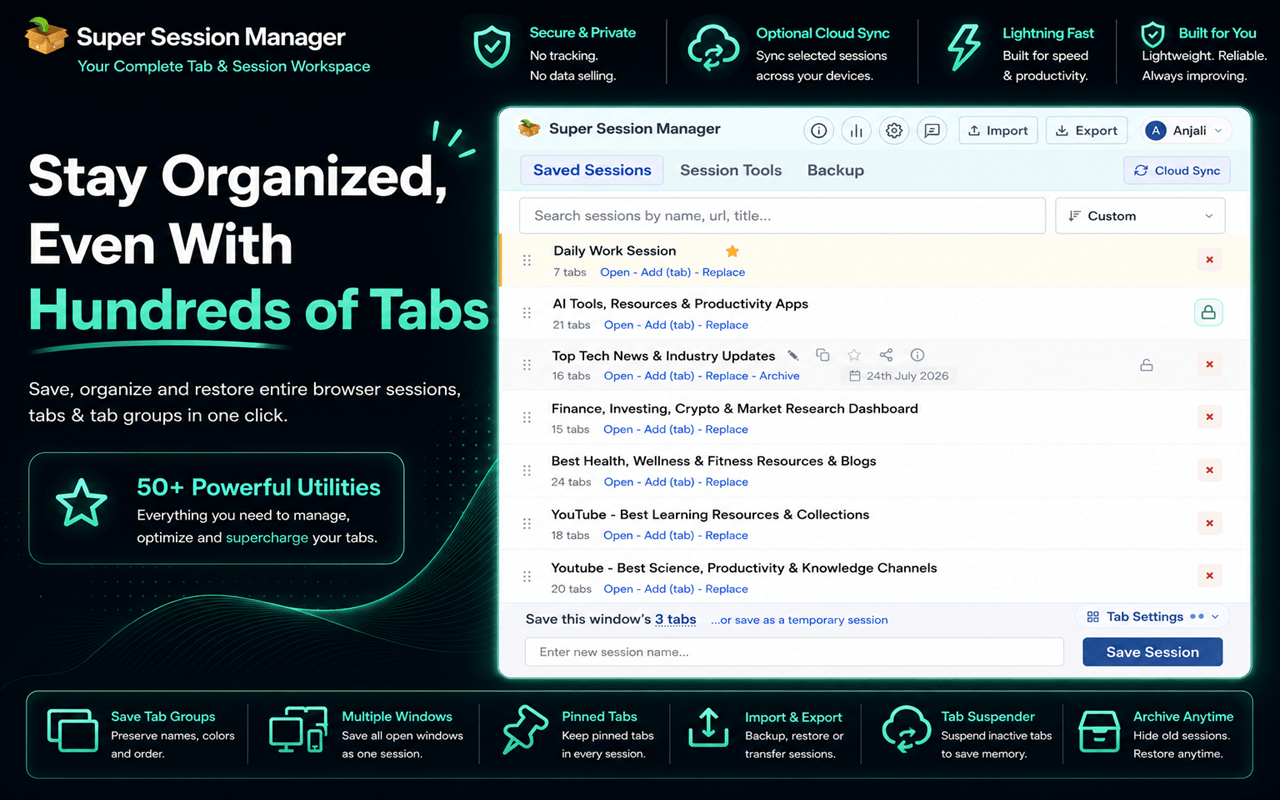
Meet Super Session Manager: A Complete Chrome Workspace Tool
Super Session Manager is designed for users who need more control over their browser workflow.
Instead of acting as only a tab saver, it works as a complete Chrome organization system.
It combines:
- Session manager capabilities
- Tab organizer features
- Bookmark manager functionality
- Browser cleanup tools
- Productivity utilities
The goal is simple:
Turn a chaotic Chrome browser into an organized digital workspace.
Whether you manage dozens of tabs every day or occasionally lose important research pages, having a structured system can save hours of wasted time.
Save and Restore Complete Browser Sessions
One of the biggest advantages of a session manager is the ability to save your current browser state.
Instead of keeping everything open permanently, you can save your complete session and close unnecessary tabs.
Super Session Manager allows users to:
- Save current browser windows
- Save multiple windows together
- Restore tabs instantly
- Preserve organized workflows
This is especially useful for people who switch between different types of work.
For example:
- A designer can create a Client Project session.
- A researcher can create a Market Research session.
- A developer can create a Development Tools session.
- Each workflow stays separate and can be restored whenever needed.
The extension also works with Chrome Tab Groups, allowing users to preserve:
- Group names
- Colors
- Tab order
Your browser setup stays organized instead of becoming a random collection of open pages.
Auto Save Snapshots: Never Lose Your Work Again
One of the most frustrating browser experiences is losing important tabs.
A browser crash.
- An accidental closure.
- A system restart.
- A forgotten update.
Suddenly, your entire workflow disappears.
Auto save snapshots solve this problem by creating recoverable versions of your browsing sessions.
Instead of worrying about losing research, projects, or important resources, users can recover their previous browser state.
This creates peace of mind, especially for professionals who depend on Chrome every day.
Your browser should support your workflow, not put it at risk.
Smart Tab Organization Without Manual Work
Managing hundreds of tabs manually takes time.
Super Session Manager helps reduce that workload with smarter organization options.
Users can organize tabs based on:
- Website domain
- Keywords
- Related topics
For example, research tabs from multiple websites can become easier to identify and manage.
Instead of searching through endless open pages, users can create a more structured browsing environment.
This is especially valuable for:
- Researchers collecting information
- Content creators gathering references
- Students managing learning resources
- Professionals handling multiple projects
A good tab organizer does not just store tabs.
It creates order.
Advanced Tab Management Tools
A session manager becomes even more useful when combined with powerful tab management features.
Super Session Manager provides tools that help users control their browser environment.
Users can:
- Sort tabs
- Merge browser windows
- Move tabs between windows
- Pin important tabs
- Mute unnecessary tabs
- Reload selected tabs
- Close tabs by domain
- Close tabs by title
These features are helpful for anyone who regularly works with large numbers of browser pages.
Instead of manually organizing everything, users can quickly clean and restructure their browser.
Improve Browser Performance With Tab Suspension
Too many active tabs can consume system resources.
Even when you are not using them, background tabs may continue using memory and processing power.
A tab suspender helps solve this problem by putting inactive tabs into sleep mode.
Benefits include:
- Lower memory usage
- Reduced CPU activity
- Better browser performance
- Smoother multitasking
You can keep important information available without forcing your computer to handle hundreds of active pages.
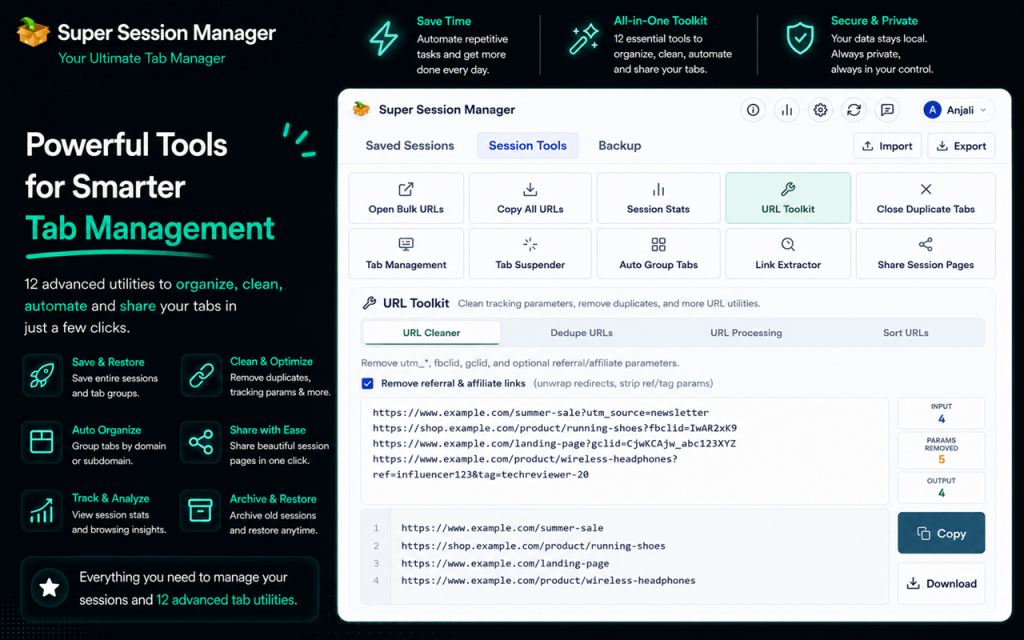
Clean URLs and Manage Research More Efficiently
Research often creates another problem: messy URLs.
Many links contain unnecessary tracking information such as:
- UTM parameters
- Referral codes
- Extra campaign data
A built-in URL cleaner helps remove unnecessary parts and keeps links cleaner.
Additional research tools can help users:
- Extract URLs
- Open multiple URLs together
- Copy links in bulk
- Export useful resources
For researchers and content creators, these small improvements can make daily workflows much faster.
Remove Duplicate Tabs and Reduce Browser Clutter
Duplicate tabs are one of the biggest sources of browser confusion.
You may accidentally open the same article multiple times.
A document may appear in three different tabs.
A research page may be duplicated across multiple windows.
Duplicate tab cleanup helps identify repeated pages and remove unnecessary copies.
This means:
- Less memory usage
- Cleaner workspace
- Faster navigation
- Less confusion
A productive browser should show you what matters, not repeat what you already have.
Understand Your Browsing Habits With Session Statistics
Organization becomes easier when you understand your browser usage.
Session statistics can provide insights into:
- Number of open tabs
- Duplicate pages
- Inactive tabs
- Frequently visited domains
These details help users identify where browser clutter comes from.
Sometimes the problem is not too many tabs.
It is the lack of a system.
Statistics help users build a better browsing workflow.
Cloud Sync and Backup Across Devices
Many people work from multiple locations.
A laptop at home.
A computer at the office.
A personal device while traveling.
Cloud sync and backup features make it easier to maintain access to important sessions across devices.
Users can also use JSON export and import options for additional backup flexibility.
Your browser workspace should not disappear when you change devices.
Privacy Focused Browser Management
Productivity tools should improve your workflow without creating privacy concerns.
Super Session Manager focuses on responsible browser management with features such as:
- Local-first storage options
- Optional cloud sync
- Minimal permissions
- No unnecessary advertisements
- Reduced tracking concerns
Users should have control over their own browsing information.
A better browser experience should also be a safer one.
How to Organize a Chaotic Chrome Browser in 5 Minutes
If your browser currently has dozens or hundreds of tabs, you can start organizing immediately.
Install Super Session Manager
Add the extension to Chrome and prepare your browser workspace.
Save Your Current Tabs as a Session
Before closing anything, save your existing browser state.
Your information stays protected.
Create Separate Workspaces
Create sessions such as:
- Work
- Research
- Learning
- Personal
Now every important activity has its own space.
Clean Duplicate Tabs and URLs
Remove repeated pages and unnecessary URL information.
Your browser becomes lighter and easier to manage.
Enable Backup and Sync Options
Protect your sessions so your workflow remains available whenever you need it.
Who Should Use a Super Session Manager?
Professionals
People managing client projects, reports, and online tools can keep every workflow organized.
Developers
Documentation, GitHub pages, testing environments, and learning resources can stay separated.
Students
Research papers, courses, and study materials can be saved as organized sessions.
Researchers
Large collections of information become easier to store and revisit.
Content Creators
References, inspiration, and publishing resources can be managed efficiently.
Final Thoughts: Turn Chrome Into a Smarter Workspace
The future of browsing is not opening more tabs.
It is managing information intelligently.
A browser should help you focus, not overwhelm you with endless pages.
A powerful tab manager gives users the ability to save workflows, organize tabs, restore important projects, and maintain a cleaner Chrome experience.
Instead of treating your browser like a temporary storage space, you can transform it into a structured digital workspace.
When your tabs are organized, your ideas, research, and work become easier to manage.
And that is the real purpose of better browser productivity.